Architecture
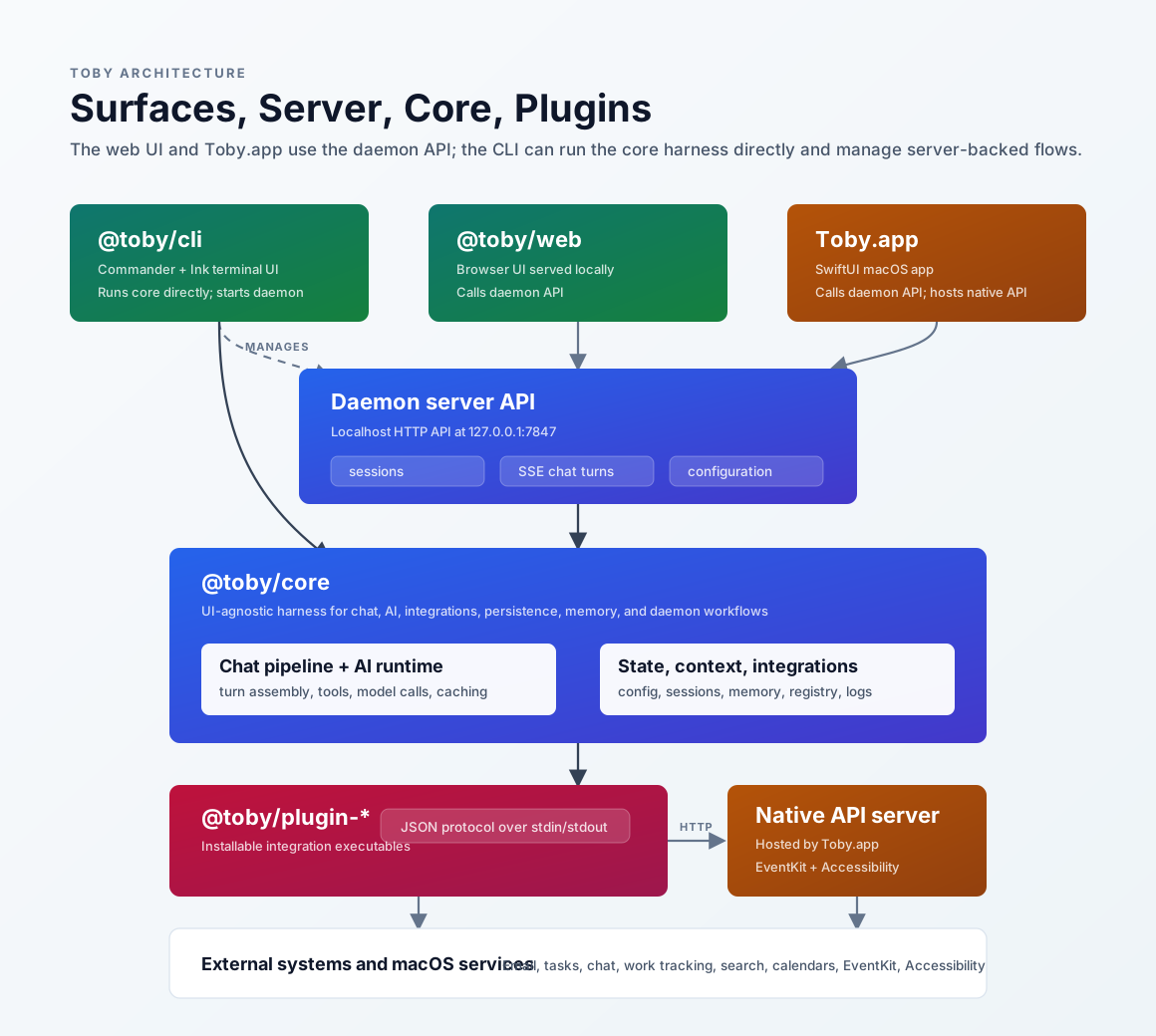
Toby is organized as a small set of modules with strict boundaries. The native
app presents the experience, a local background service exposes a localhost API,
@toby/core owns the reusable harness, and installable plugins connect Toby to
external systems through a JSON protocol.
Toby.app
Toby.app is the native macOS SwiftUI app and the primary user surface for
Toby. It bootstraps the local service when needed, then calls the same localhost
API for chat, sessions, configuration, recordings, projects, and streaming chat
turns.
Toby.app also hosts a separate native API server for macOS system operations
that require TCC permissions or native framework access. Plugins such as
Apple Calendar (toby-plugin-applecalendar), Apple Contacts, Apple Reminders,
and macOS (toby-plugin-macos) are TypeScript plugins that
delegate all native operations to the app’s native API server via
~/.toby/native-port.
See Toby.app for the user-facing app documentation, the Native API reference for endpoints, and the source native helper notes for implementation details.
Local service (daemon)
Toby runs a local HTTP service at http://127.0.0.1:7847 by default. Toby.app
starts it when you open the app and uses it for sessions, streaming chat turns,
memories, projects, configuration, status, and configure actions.
The service is local-only and uses the same core harness as scheduled jobs and inbound chat (for example Slack @mentions). Interactive chat turns stream events over SSE so the native UI can render the turn lifecycle without reimplementing the pipeline. For how chat apps connect as tools and as inbound channels, see Chat surfaces.
See Local APIs, the Server API reference,
and the Native API reference for endpoint documentation.
The daemon Server API and Toby.app’s Native API (~/.toby/native-port) are
separate surfaces.
@toby/core
@toby/core is the shared harness. It contains the chat turn pipeline, AI model
runtime, tool wiring, plugin/integration registry, configuration helpers,
memory, session storage, logging, and service-safe workflows.
Put behavior here when it can run without a UI framework—so Toby.app, scheduled jobs, and headless inbound flows share the same path.
For implementation details, see the source docs:
Plugins (toby-plugin-*)
Plugins are installable TypeScript bun-package directories (legacy standalone
executables are still discoverable). Toby finds them under ~/.toby/plugins/,
invokes one protocol operation at a time (or a long-lived inbound process),
passes configuration through stdin, and reads JSON from stdout.
All new plugins must be TypeScript bun-packages. When macOS frameworks or TCC are required, the plugin delegates to Toby.app’s native API rather than shipping its own native binary.
Toby remains the source of truth for credentials and connection state; plugins
should not read or write ~/.toby/ directly.
See Creating a plugin for the help-site guide and the source plugin protocol for the lower-level contract.
External systems
External systems are the services Toby reaches through plugins and tools:
email, tasks, chat, documents, work tracking, search, and calendars. Toby models
integrations by provider category so a session can reason about the kind of work
being requested instead of hard-coding vendor names everywhere. Web Search and
Weather are global tools (see Configuration → Web Search
and Weather), while
document stores such as Notion use the documents provider category.
See Integrations overview for available integrations, provider categories, and default provider behavior.