Flows
Flows are automated pipelines that combine your local tools (integrations such as Email, tasks, and Calendar) with a persona and an LLM to produce a result without a full free-form chat turn.
Think of a flow as a fixed recipe: fetch data with tools, then have the model write a short summary or transform that data under the persona’s instructions and model choice. That makes flows well suited for reliable, repeatable workflows—especially the short AI blurbs on Home.
What flows are for
| Piece | Role |
|---|---|
| Local tools | Read or act on connected services (unread mail, open tasks, upcoming events, and so on) |
| Persona | Supplies the model, tone, and priorities for any LLM step |
| LLM step | Turns tool results into prose or structured output (for example a markdown summary) |
Unlike chat, a flow does not improvise a multi-step tool loop. It runs a defined sequence of steps so the same job behaves consistently every time.
Built-in flows (dashboard)
Today, the flows that ship with Toby are built-in and power the home dashboard cards:
| Dashboard block | What the built-in flow does |
|---|---|
| Loads unread-style email items from your email integration, then summarizes them for the card | |
| Tasks | Loads open tasks, then summarizes what needs attention |
| Calendar | Loads upcoming events, then summarizes what’s coming up |
Those pipelines use the Home persona (configured under Settings → Home) for their model and writing style. Connect the matching integrations, leave Toby running, and Home can refresh those blurbs automatically.
Browse flows in Toby.app
Open Toby.app and choose Flows from the sidebar (or the View menu / menu bar).
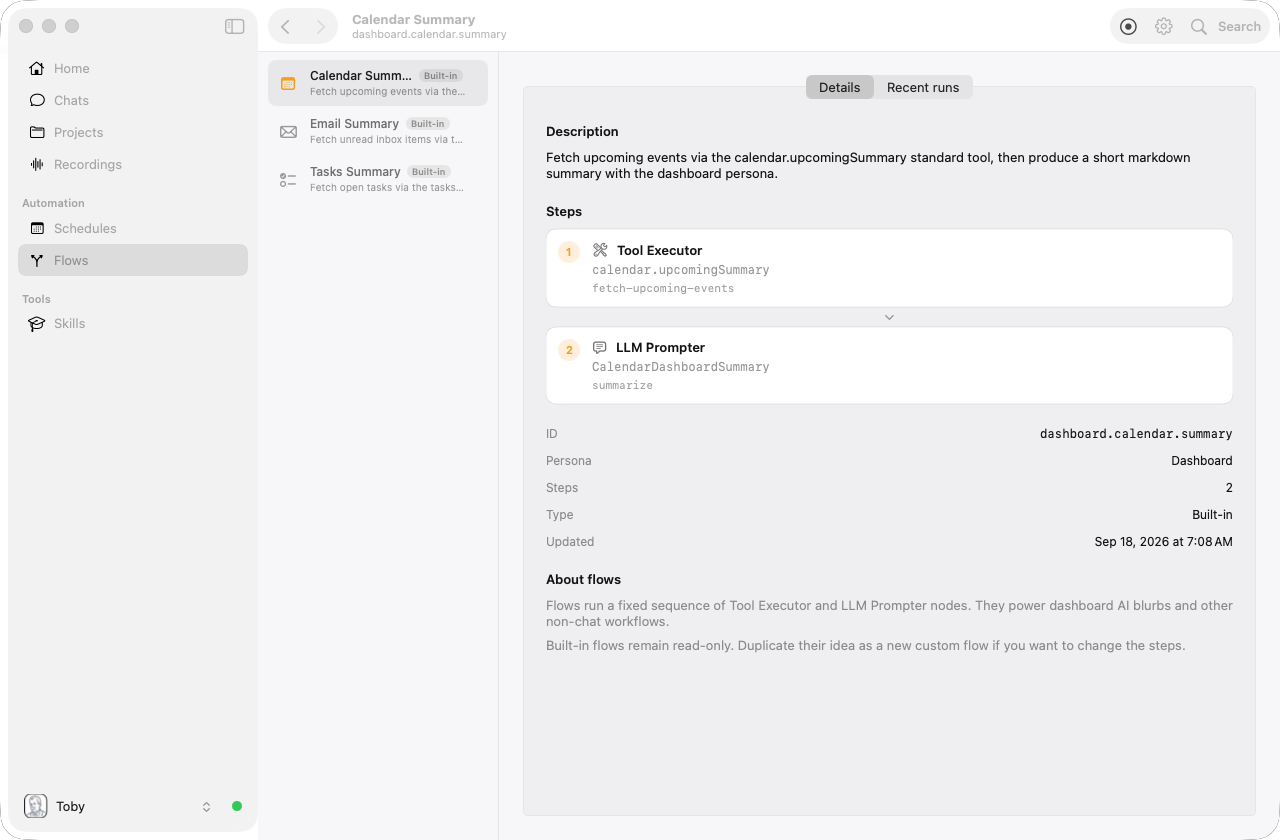
From there you can:
- See all flows in the workspace list (nothing is selected until you choose one)
- Select a flow to open its page, or click empty space in the list to clear the selection
- On Details, inspect description, steps (tool + model nodes), metadata, and finish destinations
- Switch to Recent runs for history, and open a run for status, timing, and per-step detail
Built-in flows are labeled and are read-only in the UI.
Create your own flow
Choose New flow from the toolbar. A New Flow sheet opens with Cancel and Save. Nothing is created until you Save.
- Give the flow a name and choose an icon from Toby's SF Symbol picker. The icon identifies the flow throughout Flows, schedules, and Home dashboard cards or action buttons.
- Add steps. Each step is either a tool (one action from a connected integration) or a final LLM step that writes markdown.
- For tools that need arguments (for example “Wi-Fi on/off”), fill those values when you build the flow. Steps do not pass data into later tools — that kind of mapping is not available yet.
- Choose what happens when it finishes:
- Show a result window (default)
- Send email (Email must be connected)
- Post to Slack (Slack must be connected)
- Dashboard — put the flow on the home screen as a card:
- Informational — same size as the built-in cards. Shows the last
successful run’s output. Choose how the card updates:
- As Needed (default) — when you open Home, Toby refreshes the card if the last run is older than a few minutes, the same way mail, tasks, and calendar cards update. Refresh on the card or the dashboard toolbar always runs it again.
- Manual — the card keeps the last run until you tap refresh on that card or the dashboard toolbar.
- Runner only — a button in the home dashboard Actions strip (beside the cards). The button is the flow’s name; hover to see the description. It only runs when you click it. The strip is hidden if you have no runner flows.
- Informational — same size as the built-in cards. Shows the last
successful run’s output. Choose how the card updates:
- Save, then Run now.
You can combine a dashboard card with a result window (or email / Slack). A flow can have only one Dashboard destination. Email and Slack still send when you Run now or when a schedule fires — not when the home card refreshes.
A good first flow is a focus macro: turn Wi-Fi off, then minimize all windows. Tools that need IDs from a previous search (for example “archive these messages”) still belong in chat or a schedule prompt — the model can pick IDs and call the tool itself.
To run a flow on a timetable, open Schedules, set When it runs to Flow, and pick the flow. See Schedules.
Flows vs chat vs schedules
| Chat | Flow | Schedule | |
|---|---|---|---|
| How it runs | Interactive conversation with tools chosen per turn | Fixed pipeline of tool + model steps | Fires a prompt or a flow on a cron |
| Best for | Open-ended questions and multi-step work | Repeatable summaries and automated workflows | “Do this every morning” |
| Today | Fully available | Built-in dashboard flows plus custom macros you create | Recurring prompts or a selected flow |
Tips
- Connect Email, tasks, and Calendar integrations so dashboard flows have something useful to summarize.
- Tune Settings → Home for the persona used by Home AI blurbs.
- Use the Flows window when you want to see why a dashboard blurb looks the way it does (which tools ran, and recent history).
- For a first custom flow, start with tools whose arguments you already know (Wi-Fi off, volume, minimize all). Leave “pick these emails and archive them” to chat.
Related
- Toby.app — Home, Flows window, and settings
- Personas — Model and instructions used by LLM steps
- Schedules — Recurring chat prompts (schedule-as-flow later)
- Integrations — Local tools flows call