Memories
Memories are durable facts Toby keeps about you—preferences, projects, relationships, and other context—so future chats do not start from zero.
Memories are stored separately from chat history in ~/.toby/memory.sqlite. They are not a copy of your email or calendar; integrations remain the source of truth for live data.
How memories help
- Preferences — “I prefer morning meetings,” “Use bullet summaries”
- Projects — Current initiative names, roles, or deadlines you have told Toby about
- Relationships — How you refer to people or teams (with your approval for sensitive details)
- Continuity — Schedules and later chat sessions can reuse context without re-explaining
How memories are added
Memories are created through conversation and managed in the Memories window:
- You share something worth remembering, or Toby notices a stable preference from your work.
- Toby proposes a memory (you may see tool feedback in the transcript).
- Low-risk, high-confidence preferences may be saved automatically.
- Sensitive or personal topics stay pending until you confirm.
You can also ask directly:
- “Remember that I prefer morning meetings.”
- “Save that my main project this quarter is called Northstar.”
Browse and edit in the app
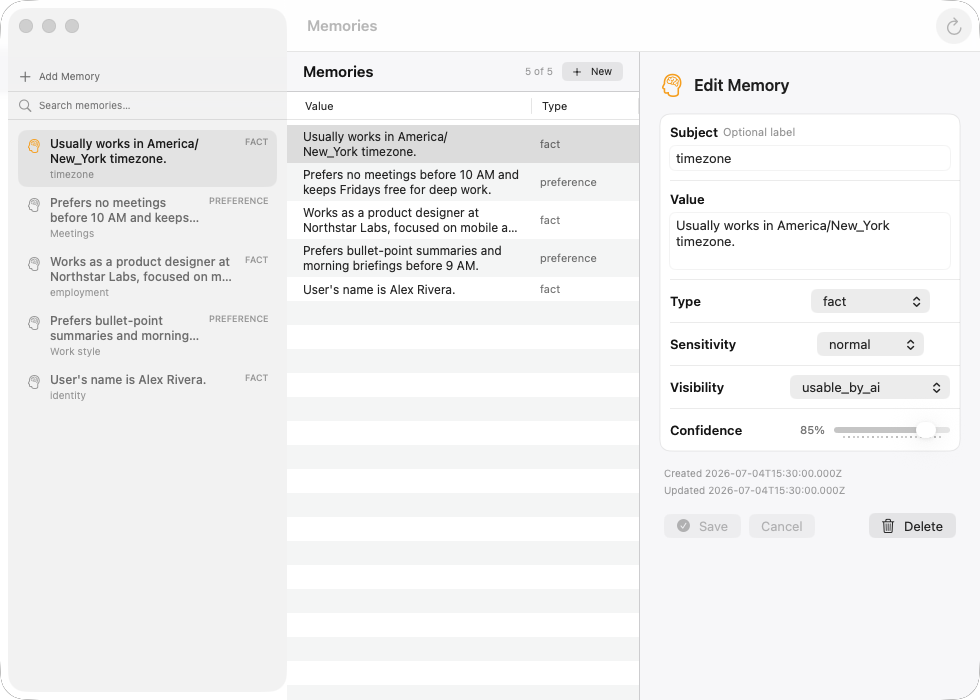
Open Toby.app and choose View → Memories (⌘6), or search for Open Memories in the command palette (⌘K). The window is a list of memories. A details bar stays at the bottom: when nothing is selected it says No memory selected. Click a row to inspect the full value, type, sensitivity, visibility, confidence, embedding, and dates. Memories with a stored semantic embedding show a small connected-dots mark in the list. Click empty space in the list to clear the selection. Use the toolbar to search, add a memory, or refresh. New and Edit open a sheet; Save persists, Cancel discards.
Search matches keywords and meaning. If your AI provider can create embeddings, a phrase like “where is my home” can find “Lives in Baltimore, Maryland” even when the words do not overlap. Repeating the same fact in different wording is merged into the existing memory instead of creating a duplicate.
The list refreshes when you open the Memories window, when chat creates or updates a memory, and on a short poll while the window is open. Use the refresh control in the toolbar if you want an immediate reload.
Privacy and confirmation
Toby classifies memory sensitivity:
- Normal preferences may auto-save when confidence is high enough.
- Sensitive or restricted topics (health, politics, finances, precise location, and similar) always require your explicit confirmation before they are stored.
You can ask Toby to forget a memory or explain where one came from (provenance and audit trail).
What you see in chat
Memory operations appear as tool activity in the transcript, for example:
- Proposing or saving a memory
- Searching or retrieving memories for a task
- Forgetting a memory
Approve or reject pending items when Toby asks.
Questions like “where do I live?” or “what’s my name?” look up saved memories. GPS (getMyLocation) is only for where this Mac is right now—not a substitute for a home address you asked Toby to remember.
Memories marked as usable by AI are also included in the chat instructions (up to a size limit) so a new conversation can use them without a search step. Private or confirmation-required memories stay out of that list.
Example prompts
| Goal | Example |
|---|---|
| Save a preference | “Remember I like standups at 10am Pacific.” |
| Recall context | “What do you already know about my current projects?” |
| Remove something | “Forget the memory about my old apartment address.” |
| Inspect | “Explain why you think I prefer async updates.” |
Memories vs chat history
| Chat session | Memory | |
|---|---|---|
| Stores | Full conversation transcript | Compact facts and preferences |
| File | ~/.toby/chat.sqlite | ~/.toby/memory.sqlite |
| Lifespan | Per session / history | Until you forget or it expires |